
Script
웹개발 종합반 1주차 본문
1.웹의 동작 개념
- html을 받는 경우
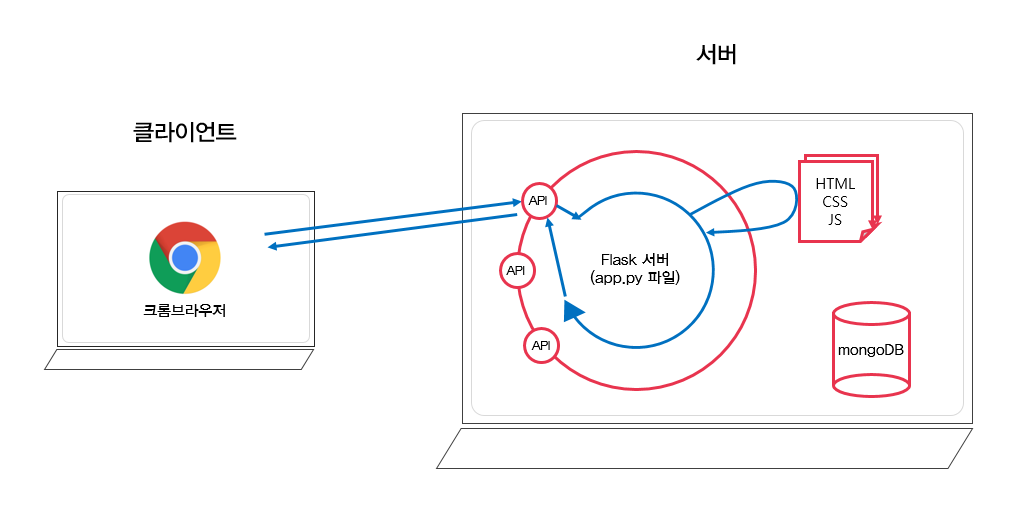
웹브라우저는 서버가 만들어 놓은 api라는 창구에 요청을 보내 html을 받아온다.
- 데이터만 받는 경우

데이터만 필요한데 html을 받아 통째로 갈아끼우면 데이터가 업데이트 될때마다
리프레시되는 현상이 나타날 것이다.
따라서 데이터만 받아서 받아 끼우는게 효율적이다(이런 상황이 훨씬 더 많다)

데이터만 받아올 경우의 생김새이다.
데이터를 JSON 형식으로 받아온 것이다.
2.폰트 변경
https://fonts.google.com/?subset=korean
Google Fonts
Making the web more beautiful, fast, and open through great typography
fonts.google.com
(1) 위 링크에 들어가서 마음에 드는 폰트와 굵기를 정해 select this style을 클릭한다.
(2) link 태그를 복사해서 <head> </head>사이에,
css를 복사해서 css 파일에 붙여넣기해 적용시킨다.
3.부트스트랩
미리 만들어진 css들을 모아둔 것
- 부트스트랩 시작 템플릿
<!doctype html>
<html lang="en">

<head>
    <meta charset="utf-8">
    <meta name="viewport" content="width=device-width, initial-scale=1, shrink-to-fit=no">

    <link href="https://cdn.jsdelivr.net/npm/bootstrap@5.0.2/dist/css/bootstrap.min.css" rel="stylesheet"
        integrity="sha384-EVSTQN3/azprG1Anm3QDgpJLIm9Nao0Yz1ztcQTwFspd3yD65VohhpuuCOmLASjC" crossorigin="anonymous">
    <script src="https://ajax.googleapis.com/ajax/libs/jquery/3.5.1/jquery.min.js"></script>
    <script src="https://cdn.jsdelivr.net/npm/bootstrap@5.0.2/dist/js/bootstrap.bundle.min.js"
        integrity="sha384-MrcW6ZMFYlzcLA8Nl+NtUVF0sA7MsXsP1UyJoMp4YLEuNSfAP+JcXn/tWtIaxVXM"
        crossorigin="anonymous"></script>

    <title>스파르타코딩클럽 | 부트스트랩 연습하기</title>
</head>

<body>
    <h1>이걸로 시작해보죠!</h1>
</body>

</html>
- 사용법
https://getbootstrap.com/docs/5.0/components/buttons/
Buttons
Use Bootstrap’s custom button styles for actions in forms, dialogs, and more with support for multiple sizes, states, and more.
getbootstrap.com
위 페이지에 들어가 필요한 코드를 복사한 후, html에 붙여넣기 한다.
1주차 숙제
위의 내용 말고도 간단한 html,css,javascript에 대해서 배웠지만,
이전에 공부했던 내용들이라, 어렵지 않게 넘어갈 수 있었다.
부트스트랩을 활용해 간단한 정적인 페이지를 만들어 보았다.

'항해99 > 사전준비' 카테고리의 다른 글
| 웹개발 종합반 5주차 (0) | 2022.07.01 |
|---|---|
| 웹개발 종합반 4주차 (0) | 2022.06.29 |
| 웹개발 종합반 3주차 (0) | 2022.06.26 |
| 웹개발 종합반 2주차 (0) | 2022.06.21 |


