
Script
반복되는 컴포넌트 처리하기 본문
1. 리액트에서의 map
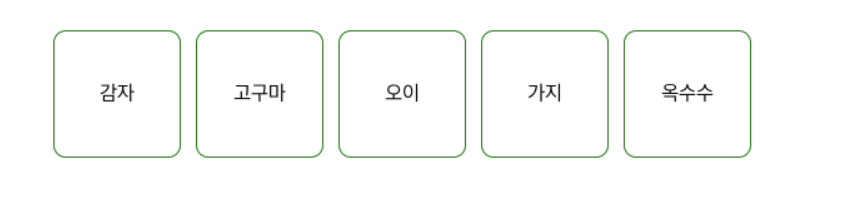
다음과 같은 박스들을 구현한다고 할때 map을 쓰지 않았을 때의 소요를 확인해보자.
map 사용 안했을 때 예시)
import React from "react";

const App = () => {
  const style = {
    padding: "100px",
    display: "flex",
    gap: "12px",
  };

  const squareStyle = {
    width: "100px",
    height: "100px",
    border: "1px solid green",
    borderRadius: "10px",
		display: "flex",
    alignItems: "center",
    justifyContent: "center",
  };

  return (
    <div style={style}>
      <div style={squareStyle}>감자</div>
      <div style={squareStyle}>고구마</div>
      <div style={squareStyle}>오이</div>
      <div style={squareStyle}>가지</div>
      <div style={squareStyle}>옥수수</div>
    </div>
  );
};

export default App;
코드가 여러번 중복이 되고 가독성이 영 좋지 않다.
map 사용했을때 예시)
import React from "react";

const App = () => {
  const style = {
    padding: "100px",
    display: "flex",
    gap: "12px",
  };

  const squareStyle = {
    width: "100px",
    height: "100px",
    border: "1px solid green",
    borderRadius: "10px",
    display: "flex",
    alignItems: "center",
    justifyContent: "center",
  };

  const vegetables = ["감자", "고구마", "오이", "가지", "옥수수"];

  return (
    <div style={style}>
      {vegetables.map((vegetableName) => {
        return (
          <div style={squareStyle} key={vegetableName}>
            {vegetableName}
          </div>
        );
      })}
    </div>
  );
};

export default App;
map은 callback함수를 각각의 요소에 대해 한번씩 순서대로 불러 그 함수의 반환값으로 새로운 배열을 만든다.
여기서 vegetableName은 콜백함수에 해당하는 함수명이므로 이름을 짓는것은 작성자 마음이며, 이는 초기값 vegetables에 해당한다.
=>를 통해 vegetables의 index들을 하나하나 호출한다. style이 squareStyle이고
key가 vegetableName인(초기값 / key는 이따가 말할테지만 변화확인을 위해 사용)
인 div에 vegetables의 인덱스값들을 하나하나 담는 것이다.
이참에 suqareStyle까지 다른 컴포넌트로 분리해보자.
import React from "react";

//  Square 컴포넌트를 분리해서 구현
function Square(props) {
  const squareStyle = {
    width: "100px",
    height: "100px",
    border: "1px solid green",
    borderRadius: "10px",
    display: "flex",
    alignItems: "center",
    justifyContent: "center",
  };
  return <div style={squareStyle}>{props.vegetableName}</div>;
}

function App() {
  const style = {
    padding: "100px",
    display: "flex",
    gap: "12px",
  };

  const vegetables = ["감자", "고구마", "오이", "가지", "옥수수"];

  return (
    <div style={style}>
      {vegetables.map((vegetableName) => {
				// 분리한 Square 컴포넌트는 이렇게 사용한다.
        return <Square key={vegetableName} vegetableName={vegetableName} />;
      })}
    </div>
  );
}

export default App;
map을 사용했을 때의 예시가 이해되었다면 위 코드를 이해하는 것은 무리가 없을 것이다.
2.객체에서의 map

import React from "react";

function User(props) {
  const squareStyle = {
    width: "100px",
    height: "100px",
    border: "1px solid green",
    borderRadius: "10px",
    display: "flex",
    alignItems: "center",
    justifyContent: "center",
  };
  return (
    <div style={squareStyle}>
      <div>{props.user.age}살 - </div>
      <div>{props.user.name}</div>
    </div>
  );
}

function App() {
  const style = {
    padding: "100px",
    display: "flex",
    gap: "12px",
  };

  const users = [
    { id: 1, age: 30, name: "송중기" },
    { id: 2, age: 24, name: "송강" },
    { id: 3, age: 21, name: "김유정" },
    { id: 4, age: 29, name: "구교환" },
  ];

  return (
    <div style={style}>
      {users.map((user) => {
        return <User user={user} key={user.id} />;
      })}
    </div>
  );
}

export default App;
App 실행 - {style} 씌워진 <div>생성- div 안에서 User 컴포넌트 호출(user={user / key값은 user id} 건네 주면서)
-User 컴포넌트 실행- squareStyle 씌워진 div 생성- div 안에서 props로 받은 user 정보로 age와 name 나타냄
- 이는 map 함수 특성으로 인해 index 돌며 하나하나 만들어져 새로운 배열 생성함- 출력
3.key란?

리액트에서 map을 사용하여 컴포넌트를 반복 렌더링 할 때는 반드시 컴포넌트에 key를 넣어줘여 한다.
key가 필요한 이유는 React에서 컴포넌트 배열을 렌더링 했을 때 긱긱의 원소에서 변동이 있는지 알아내려고
사용하기 때문이다.
만약 key가 없다면 React는 가상돔을 비교하는 과정에서 배열을 순차적으로 비교하면서 변화를 감지하려 한다.
하지만 key가 있으면 이 값을 이용해서 어떤 변화가 일어났는지 더 빠르게 알아낼 수 있게 된다.
즉, key값을 넣어줘야 React의 성능이 더 최적화 된다. 라는 의미이다.
  <div style={style}>
      {users.map((user) => {
        return <User user={user} key={user.id} />;
      })}
    </div>
키 값을 넣는 방법이다.
또한 간혹 key값에 map에서 지원해주는 index를 이용해서 key를 넣는 경우가 있는데, 이것은 좋지 않은 방식이니
지양하도록 하자.
ex) map((value,index)=>{})
'항해99 > 3주차 주특기 기초' 카테고리의 다른 글
| 3주차 과제 완성 ( Redux없이 만든 TodoList ) (0) | 2022.07.28 |
|---|---|
| 컴포넌트 스타일링 (0) | 2022.07.25 |
| State 응용(input, button) / 리액트에서의 불변성 (0) | 2022.07.25 |
| State (0) | 2022.07.25 |
| 구조분해 할당과 Props / default Props (0) | 2022.07.23 |


